 RackAudioSuite
Free plugin for Pro Tools · macOS
In development
Your whole AudioSuite chain. One pass.
A VST3 and AU plugin rack for Pro Tools. Preview and print the whole chain in a single AudioSuite render, instead of one plugin at a time.
Free download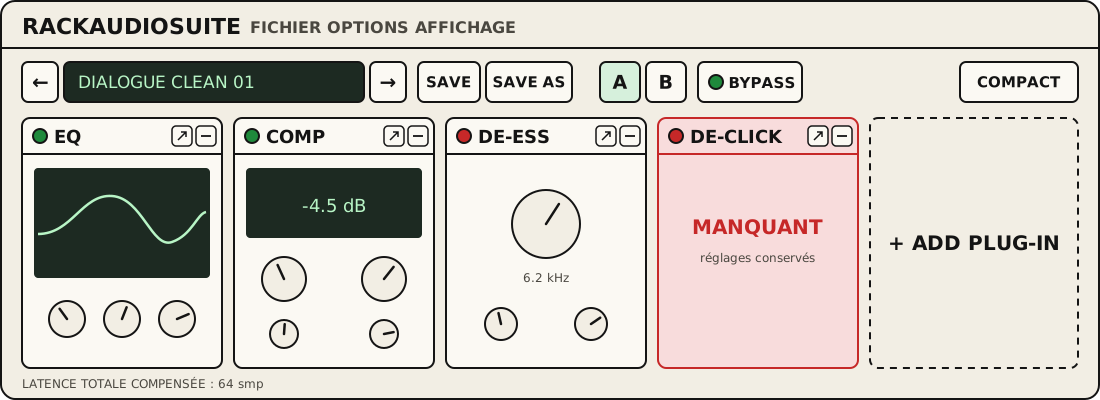

What it does
- A chain of VST3 and AU plugins side by side, with their interfaces in the rack or in separate windows.
- Preview and render the whole chain in one AudioSuite pass. Also works as an insert.
- Compact mode: a thin bar with the preset, A/B, bypass and plugin names. The AudioSuite window stays open.
- Chain presets, A/B of the whole chain, per-plugin or global bypass, with latency compensation.
- A plugin missing on another machine keeps its slot and settings.
- AAX, VST3, AU and standalone app. Apple Silicon and Intel.
The rack cannot load AAX plugins: a plugin sold only as AAX cannot be added to the chain. macOS only.
Download
Installer signed and notarized by Apple. Free, no sign-up.
The plugin is still in development: the download is not open yet.
Questions
Why no AAX plugins in the rack?
Only Avid's software can load AAX plugins. The rack uses the VST3 or AU versions of your plugins, which most developers install alongside AAX.
A plugin doesn't show up in the list?
The rack only lists VST3 and AU plugins. On an Apple Silicon Mac, an Intel-only plugin cannot load. The scan runs separately: a plugin that crashes during the scan is set aside without closing the rack. Update it, then run the scan again.
Do Preview and Render stay visible in compact mode?
Yes. Pro Tools draws these buttons and the AudioSuite options above the plugin itself. Compact mode shrinks the rack, not those controls.
Where are the files installed?
In the standard macOS folders (/Library/Audio/Plug-Ins and /Library/Application Support/Avid/Audio/Plug-Ins). Presets live in ~/Music/RackAudioSuite/Presets. To uninstall, delete the RackAudioSuite files from these folders.